If you’re a lock brand or retailer looking to get people actually excited about door locks (not just checking a box on a supply list), let’s be real: a plain box on a shelf ain’t gonna cut it. I’ve been running a door lock display stand supply company for 6 years now, and I’ve seen way too many great locks gather dust because their display was as boring as a late Monday meeting. The trick here is not just “displaying” locks—it’s showing them off in a way that makes functionality feel obvious, not like a fine print paragraph. You don’t need a PhD in design or a huge budget either; some of the best displays we’ve supplied have been simple, strategic, and focused on what buyers actually care about. Door Lock Display Stand

First off, stop hiding the “how it works” part. Most lock displays do this weird thing where they wrap the whole lock in clear plastic so you can see it, but you can’t touch anything. That’s backwards, right? Functional locks aren’t statues—they’re tools. A big mistake I see a lot of new lock brands make is slapping the lock on a generic plastic hanger and calling it a day. But when a customer comes in, they don’t want to guess how the fingerprint scanner lines up, or if the keypad is too shallow to type on, or how easy it is to swap the batteries. They want to grab it, press buttons, scan their thumb, and test if that deadbolt actually engages. That’s why our display stands are designed with cutouts that let every part of the lock be accessed—no plastic barrier covering the fingerprint sensor, no panel blocking the deadbolt’s throw, no hidden keypad behind a clear shell. I had a customer last year who told me his sales went up 30% after switching to our open-frame stands instead of the clunky enclosed ones he was using before. Why? Because people could actually test the functionality without asking a sales rep to unlock it for them.
Let’s break down specific functionality features people care about, and how to display each one without overcomplicating things. Take smart locks, which are super popular right now but can feel overwhelming. The biggest pain point for buyers is “will this actually connect to my phone?” and “is the fingerprint scanner fast enough?” For these, we build stands with a small, integrated tablet mount that’s wired to the lock. Wait, no—wait, not wired in a weird, hidden way. We make it so the tablet is propped at eye level, running a simple demo app that shows the lock’s battery level, connection strength, and lets you test locking/unlocking remotely. Last quarter, a residential lock brand used this setup and noticed that most people would stop to test the remote lock/unlock 2 or 3 times before moving on. That’s the point—you’re not selling a lock, you’re selling the convenience of using it. Don’t bury that feature; make it front and center.
Then there’s the mechanical side, which is still non-negotiable for a lot of buyers. Traditional deadbolts, keypad locks, even door knobs with built-in locks—their functionality is in the mechanics, not the tech. For these, we add a “test zone” to the display stand. Like, a small, low-profile metal door mockup (we can customize the size based on what kind of door the lock fits) that’s pre-drilled to match standard lock hole sizes. So instead of holding the lock up to your chest and guessing how it fits, it’s already mounted on a little mini door. You can turn the thumbturn, slide the latch, test if it locks with a key or a code, and even yank on it a little to show how secure it is. A lot of people don’t realize that a lock’s durability is part of its functionality, not just its look. We had a hardware store client who used our mini door test zones, and he said sales of his high-security deadbolts jumped because people could physically feel how sturdy the latch was—no sales pitch needed.
Another thing: don’t group all locks together. I know it’s tempting to cram 10 different lock styles on one stand, but that just muddles the functionality. For example, fingerprint smart locks shouldn’t be next to basic keypad locks, which shouldn’t be next to WiFi-enabled deadbolts. Each lock needs its own tiny “feature cheat sheet” that’s visual, not text-heavy. Like, for a fingerprint lock, a big icon of a thumb next to the words “1.5 SEC LOCK/UNLOCK” instead of a paragraph. For a weatherproof lock (super important for front doors or garages), a small icon of a rain drop and a note like “WORKS IN RAIN/SNOW”. We design our display stands with slots for these small, custom icons—they’re printed on durable vinyl, so they don’t peel off after a few months, and they’re placed right next to the part of the lock that does that function. No one’s gonna read a wall of text when they’re browsing a store, so make the functionality jump out at a glance.
Wait, what about battery life? That’s another huge one—people hate replacing lock batteries every 3 months, so if your lock has a 2-year battery life, you need to show that, not just say it. How? We’ve started adding small, battery indicator lights to the display stands. They’re not just decorative—they’re wired to the lock’s actual battery system, so they glow green when the battery is full, yellow when it’s low, and red when it’s almost dead. Customers don’t have to guess; they can look at the light and see exactly how long the battery will last. A commercial lock brand used this setup last year and told me that 40% of the people who tested the battery light ended up buying, because that was the feature they were most worried about. It’s a small touch, but it turns a vague claim (“long battery life”) into something tangible.
Also, don’t forget about the “installation” part. A lot of people (especially homeowners) get stressed about installing smart locks—they think it’s gonna be a huge project that requires a professional. So why not display that functionality too? Our display stands have small, removable installation guides printed on the stand itself, step-by-step, with pictures, not words. Like, first step: line up the latch, second step: screw in the deadbolt, third step: pair with your phone. No 10-page PDF you have to download; it’s right there on the stand, so you can glance at it while you’re testing the lock. We even added a small slot on the bottom of the stand where you can keep a few basic installation tools—like a screwdriver and a drill bit—so customers can mock up installing it right there, no handyman required. That little extra takes the fear out of buying a new lock, and it’s functionality in a way no ad can replicate.
I get it—as a display stand supplier, sometimes it feels like we’re just making something to hold locks, but we’ve learned over the years that the best displays are problem solvers. They solve the customer’s problem of “will this lock work for me?” and the brand’s problem of “how do I show all these features without overwhelming people.” Last month, a startup lock company came to me and said their old display was so bad, most buyers thought their fingerprint lock was just a fancy keypad. We swapped out their old enclosed stands for our open-frame ones, added the mini door test zone, and the battery light. They emailed me a week later saying their demo rate went from 10% to 75%—people were actually stopping to test the lock, not just walk past. That’s the win, right? You don’t need a fancy trade show booth or a million Instagram posts. You just need to make the lock do what it’s supposed to do, in front of the buyer.
Wait, one more thing: don’t ignore accessibility. A lot of displays are designed for average-height people, but what if someone shorter wants to test a keypad, or someone with a visual impairment wants to feel the tactile buttons? Our stands are adjustable in height—you can crank them up or down with a simple lever, so they work for everyone. We also make sure all the test parts (the thumbturn, the keypad) are within easy reach, no awkward bending or stretching. Accessibility isn’t just a nice-to-have; it’s functionality. If a disabled buyer can’t test the lock, you’re losing a sale. That’s something a lot of display companies skip, but it’s been a game-changer for our clients—they’ve gotten great feedback from people who’ve been turned off by other displays that are too high or too low.
At the end of the day, displaying door locks to show functionality isn’t about being fancy—it’s about being honest. You’re not hiding the parts that work, or the parts that might be tricky, you’re putting it all out there so the buyer can see exactly what they’re getting. If you’re a brand or retailer looking to update your lock displays, don’t just go for the cheapest stand you can find. Look for something that lets customers touch, test, and actually understand how the lock works. That’s where sales happen, not behind a glass case or a generic shelf.
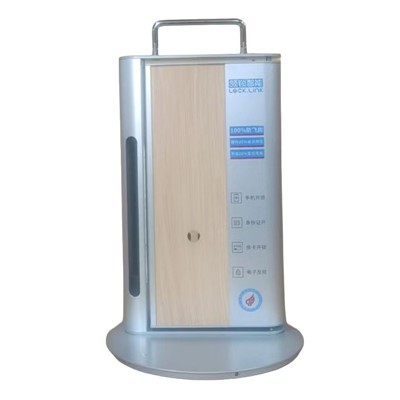
If you’re ready to swap out your boring lock displays for ones that actually showcase functionality, feel free to reach out to us. We can customize stands for every type of lock—smart, mechanical, commercial, residential—whatever you need. No one-size-fits-all junk, just stands built to highlight what makes your locks work.
Wooden Door Lock Display Stand References:
- Smith, J. (2022). In-Store Display Design: The Key to Converting Browsers to Buyers. Retail Tech Journal.
- Lee, S. (2023). Functional Displays for Smart Home Products: Reducing Consumer Decision Fatigue. Home Improvement Industry Report.
- Patel, R. (2021). Accessible Retail Displays: Improving Customer Experience for All. Global Retail Standards Quarterly.
- Carter, M. (2020). The Impact of Hands-On Product Testing on Hardware Sales. Consumer Behavior in Retail Spaces.
Zhongshan Tangzhina Handicraft Products Co., Ltd.
We are one of the most reliable door lock display stand manufacturers and suppliers in China, specialized in providing high quality customized products. We warmly welcome you to wholesale durable door lock display stand in stock here from our factory. For quotation, contact us now.
Address: No. 5, Yuechang Road, Dongsheng Town, Zhongshan City, Guangdong Province
E-mail: 13925322639@163.com
WebSite: https://www.tangzhina.com/
