If you’ve ever stood next to a machining center when a new job starts, watched a tool grind into raw material, and wondered how it gets every dimension right within thousandths of an inch, chances are a probing system is hard at work in the background. As a machining center supplier who’s spent the last 12 years walking shops from small jobbing outfits to large aerospace factories through this tech, I’ve seen probing turn what used to be a day of setup headaches into a 15-minute process that doesn’t require locking up a skilled machinist for hours. Today I’m breaking down how to use this tool properly—not just to check parts, but to make your machine pull more consistent work, reduce scrap, and free up your team for more complex tasks. Machining Center

First, let’s cut through the confusion: a probing system isn’t some fancy add-on that only expert operators can use. It’s a precision tool—usually a touch-trigger probe mounted to the spindle or a fixed port on the machine’s table—that sends real-time data to your control. The biggest mistake I see shops make is treating it like a glorified part checker. It’s actually a setup assistant, a tool wear monitor, and a quality gate all in one, if you know how to use its three core functions. Let’s start with the most important use: workholding alignment.
Most new operators will pull a raw block of aluminum, clamp it in the vise, jog the machine over to use edge finders, and spend 20 minutes nudging the part until it’s “close enough” to the machine’s coordinate system. That method works for simple work, but for any job where tolerance is tighter than .005 inches? It’s a recipe for scrap. A probing system eliminates that guesswork in a few simple steps. Let’s walk through it with a common machining center set up on our shop floor: first, you’ll call up the probe tool from your tool list—we label probe tools with a high number, like T9, so operators don’t accidentally run a end mill where the probe should go. Next, you’ll enter a probing cycle: start by moving the probe to a position 0.5 inches above the part’s top surface, well clear of clamps, so the machine doesn’t crash. When you trigger the cycle, the probe will slowly lower to touch the part’s X edge, send a signal to the control, record that coordinate, then move to touch the opposite X edge, average the two to find the exact X centerline of the part. It’ll do the same for Y, then touch the top Z surface to set your part height zero. The whole thing takes 90 seconds, and the accuracy is within .0005 inches—something even the most skilled operator can’t do with a manual edge finder, especially after a long shift.
But here’s where most shops leave value on the table: probe calibration. I can’t tell you how many times I’ve heard operators say “the probe is always off” when they just skipped the calibration step. Calibrating isn’t a one-time job—it should be part of every new job setup, because the probe can shift slightly from tool changes, spindle wear, or even temperature changes in your shop. The calibration process uses a precision reference ring we provide with every probing system (we include it standard on all our machining centers, by the way). You run the probe around the inner edge of the ring, and the control calculates the probe’s trigger offset—how far the stylus tip is from the actual spindle center. If you skip this, every measurement will be off by a consistent error that adds up fast when you’re cutting 100 parts a day. A proper calibration takes 2 minutes, and we train every operator on our machines to do it as the first step of any new run, not something only the setup tech can do.
The second core function of probing is tool and work quality monitoring, and this is where shops often see the biggest reduction in scrap. Let’s say you’re running a batch of 50 aluminum engine blocks, and your ½ inch end mill starts to wear after 20 parts. Without a probe, you’re checking each part after it’s finished, which means you have to scrap the 20 parts that were cut with the dull tool. With a probing system, you can set a tool length check cycle at the start of the run. Every time the tool is swapped into the spindle, the probe touches a reference block on the table, measures the actual length, and compares it to the original program. If it’s worn more than .002 inches, the machine automatically pulls a new tool—no operator has to stop and check. For workpieces, you can also set in-process checks: after cutting a pocket, the probe touches three points on the wall of the pocket to verify its diameter is correct before the next operation. If it’s off, the machine adjusts the tool offset instead of continuing to cut bad parts. Last year, one of our customers a small medical device shop, told us they cut their scrap rate by 18% after adding a probing system to their vertical machining center, all from fixing small tool wear issues before they caused problems.
Now, let’s talk about common mistakes that I see new users make, because even a good probe will waste your time if you’re using it wrong. First mistake: running probing cycles too fast. I’ve had operators crank up the feedrate on a touch cycle to save time, and what happens? The probe slams into the part, bends the stylus, and now all measurements are off. The control settings for probing feedrates are there for a reason—usually a low “approach” feedrate to get close, then a slow “touch” feedrate when the probe makes contact. That slow touch rate is what prevents stylus damage, and it doesn’t add noticeable time to the cycle. Second mistake: not accounting for part irregularities. If you’re probing a cast part, for example, the surface isn’t perfectly smooth, so a single touch point will give a bad coordinate. We train our operators to use multiple touch points on rough cast surfaces, averaging the results to cancel out the texture of the raw material. Third mistake: forgetting to reset the probe to a safe position after every cycle. It sounds simple, but I’ve seen a shop scrap a $500 titanium part because the operator didn’t move the probe back to its tool pocket after probing, and the next tool change ran over it mid-cycle. We now add an alarm prompt to all our probing programs to prevent that, but it’s still a good habit to double-check.
Another underused feature of probing is part orientation for 4th axis jobs. If you’re running a lathe or a machining center with a rotary axis, you need to make sure the part is aligned perfectly with the rotary table’s center. A manual alignment can take 10 minutes, but a probing cycle will do it in 2 minutes: the probe touches the part’s outer edge in two positions, calculates the exact offset between the part’s center and the rotary axis, and applies that correction to the program. We recently worked with a defense contractor that runs 4-axis machining centers for missile components—they went from 15 minutes of setup per part to 3 minutes, and reduced their setup errors by 90% after switching to automatic probing alignment for rotary work.
Let’s get practical with a real example, something I walked through with a customer just last month. They had a job making small aluminum brackets for HVAC systems, running on one of our 3-axis vertical machining centers, and they were getting 2-3 scrap parts every run because the vise alignment was off. Here’s the step-by-step we had them use to set up the job with probing:
- Start with the machine at home position, probe loaded as T9. Run the probe calibration cycle using the reference ring: enter G65 P9810 (our custom probing macro), input the ring diameter, and let the machine run 3 quick touches around the ring. This takes 2 minutes, and sets the control’s probe offset correctly.
- Move the probe to a safe position above the vise, then run the part alignment cycle: enter the part’s expected size (4 inches by 2 inches by ½ inch), and the machine will touch the left, right, front, and back edges of the bracket to calculate its exact X and Y centers. It will also touch the top surface to set Z zero, all without the operator touching the jog wheel.
- Once alignment is done, the machine runs the first operation: drilling two ¼ inch holes. After drilling, the probe is called again with a hole measurement cycle to check the hole’s diameter. If it’s within .001 inches of the program’s target, the machine moves to milling the bracket’s outer shape. If it’s off, the machine adjusts the drill offset and moves on.
- At the end of the run, the probe touches four corners of the finished bracket to verify the overall dimensions, and sends a part pass/fail signal to the machine’s control. The operator only has to unload the good parts, no manual measuring with calipers for every one.
The customer told us after a week of using this setup, their scrap parts dropped from 2.5 per run to zero, and their setup time per job went from 25 minutes to 8 minutes. That’s the real value of probing—it’s not just a tool for quality, it’s a tool that makes every hour of your operator’s time count.
Now, for shops that are hesitant to add a probing system because they think it’s too complex: there are options for every level. We offer basic probing systems for entry-level machining centers that only do simple part alignment and tool checks, and advanced systems for high-tolerance work that can do in-depth part inspection and complex alignment. The key is to match the probing system to your actual needs, not the maximum possible features. A small shop making simple brackets doesn’t need a probe that can measure 100 points on a part—they just need it to align the part and check holes. A shop making medical implants, on the other hand, will want the advanced features to check every dimension mid-run.
I also want to talk about maintenance, because a probing system only works if you take care of it. The stylus is the most delicate part—we recommend replacing the stylus tip every 6 months, or if you see any signs of bending or wear, even if it looks fine. The reference ring should be cleaned weekly with a soft cloth and alcohol, because oil or shavings on the ring will throw off calibration. And you should do a quick probe check at the start of every shift: run a 1-point touch on the reference block, and compare the measurement to the last time you calibrated. If it’s off by more than .001 inches, re-calibrate the probe—it’s a 2-minute job, way better than running a whole batch of bad parts.
If you’re running a machining center and you’re still doing manual setup, or checking every part with calipers or micrometers, a probing system might be the upgrade you didn’t know you needed. It doesn’t have to be a big, scary investment—when we work with customers, we start by walking through their current pain points, whether that’s scrap parts, long setup times, or operators being tied down to manual measuring, then recommend the probing setup that fits their budget and their jobs. We don’t sell one-size-fits-all solutions, because every shop’s needs are different.
At the end of the day, machining is all about consistency. A probing system takes the human error out of the setup and measurement process, so every part you make is the same as the last one, whether you run one part or 1,000. It frees your skilled operators to focus on the tricky, high-value jobs that require their expertise, instead of spending hours setting up work or checking dimensions. It reduces scrap, which puts money back in your pocket, and it makes your whole shop run smoother.
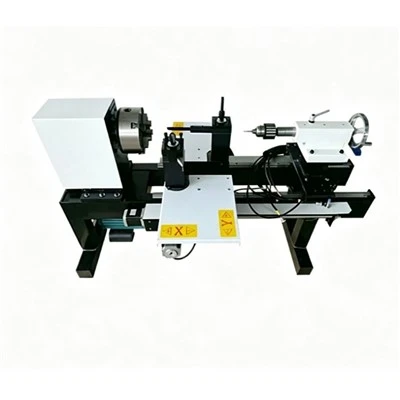
If you’re interested in learning how a probing system could work for your machining center, or want to see a live demo of how we set up the alignment and in-process checks I talked about, we’re here to help. We work with shops of all sizes, from 1-person job shops to large manufacturing facilities, and we tailor every setup to your specific jobs. Reach out to us to discuss your needs, and we can walk you through how to integrate a probing system into your current workflow without disrupting production. We’ve seen hundreds of shops turn around their quality and productivity with the right probing setup, and we can help you do the same for your operation.
Machining Center References
- Machining Probing Systems: A Practical Guide for Operators and Setup Technicians, SMETEC Manufacturing Technology Journal, 2022
- Reducing Machining Setup Time with Automatic Part Alignment, North American Metalworking Association, 2021
- Tool Condition Monitoring for CNC Machining Centers, Industrial Press, 2020
- Probe Calibration Best Practices for High-Tolerance Machining, Journal of Manufacturing Processes, Vol. 47, 2022
Jiangsu Xuanman Intelligent Equipment Co., Ltd.
As one of the most professional machining center manufacturers in China, we’re featured by quality products and low price. Please rest assured to buy discount machining center made in China here from our factory. Customized orders are welcome.
Address: No.1-1, Weier Road, Jieji Equipment Manufacturing Industrial Park, Sihong County, Suqian City, Jiangsu Province, China
E-mail: jsxmzn@163.com
WebSite: https://www.xm-machs.com/
